If full-fibre broadband has reached your street, YouFibre is worth a proper look before you renew with your current provider. I switched a few months back, and the speed and the three-day installation were both better than I expected.
This is my own experience as a paying YouFibre customer, not a rewrite of their marketing. I'll also tell you exactly where I benefit if you sign up through my referral code, so you can weigh that against everything else here.
Quick heads-up before you read on: my referral code is WE5AZL. Order with it and you can get up to £100 back, and so can I, depending on the package you choose and the terms running at the time. Full detail further down.
What YouFibre offers in Liverpool
YouFibre runs fibre directly to the property, with packages from a few hundred megabits up to multi-gigabit, depending on your address.
My installation was booked and completed three days after I ordered. That won't be everyone's experience.
Upload speed has been the biggest practical difference for working from home.
YouMesh is YouFibre's mesh Wi-Fi add-on for larger homes, priced separately from the broadband package.
Not every Liverpool address can get YouFibre yet. Check your postcode before you get excited.
Use my code WE5AZL when you order and you can both get a reward, up to £100 depending on the package and the current offer. I get one too. Check the live terms before you order.
Why the speed is the reason to switch
Every broadband provider quotes big numbers. What matters is whether the connection holds up when several things are happening on it at once: a video call, a big upload, a couple of phones streaming, someone gaming.
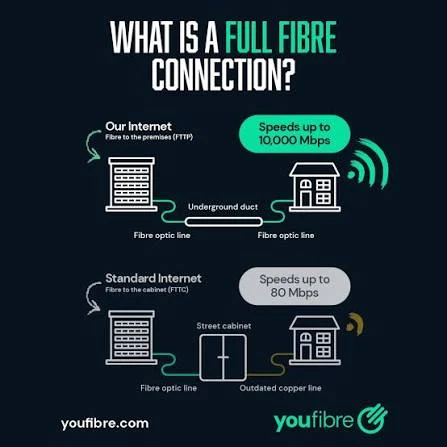
YouFibre is full fibre, meaning the fibre optic line runs to the property rather than stopping at a street cabinet. On my package, uploads are fast enough that sending large files or backing up to the cloud no longer feels like it's holding up everything else on the connection. If you work from home or run anything online, that upload speed matters as much as the download number on the box.
The difference is the last stretch: full fibre runs to your door, standard fibre broadband finishes over copper from the street cabinet · Image: YouFibre
My installation took three days
I ordered on a Tuesday and had a working connection by Friday. The engineer ran the fibre into the property and fitted the router in about an hour.
I wouldn't treat three days as a guaranteed timeline. YouFibre's own site says installation depends on whether the network has already reached your address and on engineer availability, so ask for a specific date when you order rather than assuming mine. If you're switching provider, keep your old connection running until the new one is confirmed working.
YouMesh, for houses where Wi-Fi doesn't reach every room
A fast connection coming into the house doesn't guarantee good Wi-Fi in every room. Walls, floors and distance from the router all cut into signal strength, so a back bedroom or a converted loft can lag well behind the headline speed.
YouFibre's answer is YouMesh: extra Wi-Fi units placed around the house so devices connect to whichever one is closest, instead of everything relying on a single router. It's aimed at larger properties rather than a typical terrace or flat. YouFibre has priced it from around £5 a month on some packages, but check the current price when you order, since add-on pricing moves.
Check YouFibre reaches your address first
Availability is street by street, not area by area. Two houses a few doors apart can have different options, so don't assume you're covered because a neighbour has it.
The only reliable way to check is YouFibre's postcode checker on their site. It takes a minute and tells you what packages are available at your address.
Do you need the fastest package?
Probably not, if you mainly browse, stream and use social media. The gap between a mid-range fibre package and the fastest one won't be obvious for that kind of use. If you're moving to the city and setting up a new connection is one of a dozen things on your list, our first-week guide for moving to Liverpool covers the rest.
It's more useful if you work from home, upload large files regularly, have several people working or gaming on the connection at once, or want headroom for a smart-home setup with a lot of connected devices. For me, the upload speed on the higher package has been worth it; for a lot of households, a mid-tier package will do everything they need.
What to compare before you switch provider
Don't compare providers on monthly price alone. Check the contract length, what router and Wi-Fi equipment is included, whether a mesh add-on is available if you need one, and what happens at the end of the contract if you don't switch again.
I took a 12-month contract. Prices and current offers change often, so check YouFibre's current packages and their support pages for installation and equipment details before you sign up.
My referral code, and what you get back
I'll be upfront: I am a YouFibre customer, and if you order using my referral code, I get a referral reward under YouFibre's current scheme. You can qualify for a reward too, as the new customer, depending on the package and the terms running at the time.
My referral code is WE5AZL. Under YouFibre's current referral scheme, that can mean up to £100 back for you and up to £100 for me, depending on the package you order and the terms running at the time.
Referral terms and reward amounts change, so check the current offer on YouFibre's site before you order rather than relying on anything written here. I'm including the code because I use and rate the service, not the other way round.
What to do next
Check your postcode on YouFibre's site to see what's available at your address. If you've got a larger house, look at YouMesh alongside the broadband package rather than just picking the fastest speed on offer.
If you're currently on a slow connection and work from home, the upload speed alone is worth comparing against what you're paying now. If you sometimes need to work outside the house too, our guide to where to work remotely in Liverpool by area covers places with reliable Wi-Fi as a backup.
Current Liverpool scam warnings, including rogue traders, fake calls, parking QR code scams, student fraud and how to report suspected fraud in Merseyside.


Comments
Join the conversation with your L1Local Community account. Keep it civil and on topic.